
Creating videos, images, posters, reports and websites usually requires different software. Paying for every platform separately can become expensive, especially for students, freelancers and small content teams.
AI tools can reduce some of this cost. They can also save time when you need a quick first version of a video, design, report or website.
The best AI tools for content creation are not limited to images or writing. Some help with cinematic videos, while others support research, design, coding and prompt testing.
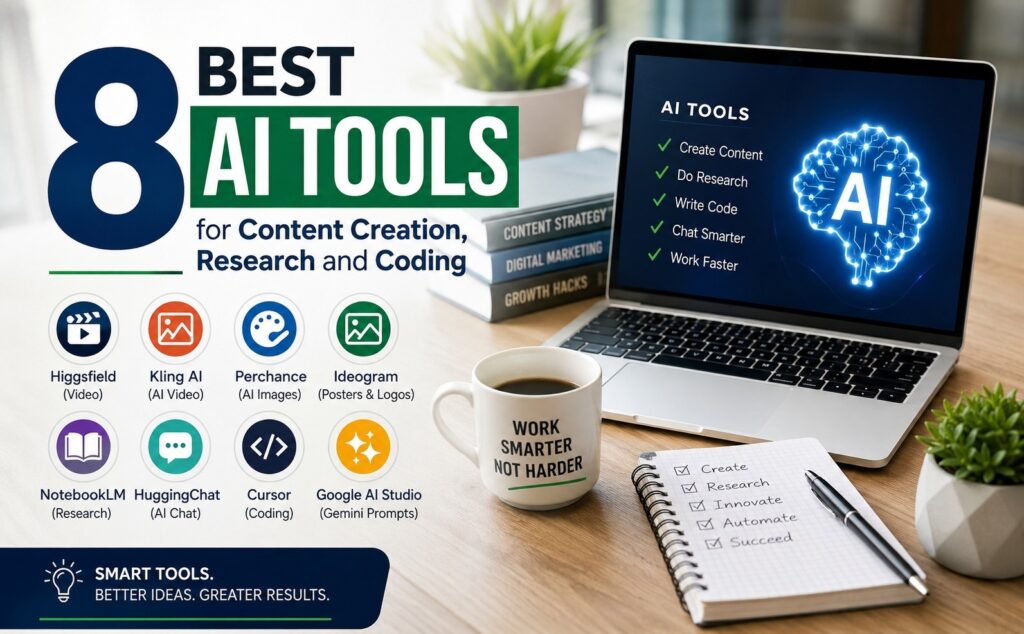
This article explains eight useful platforms: Higgsfield, Kling AI, Perchance, Ideogram, NotebookLM, HuggingChat, Cursor and Google AI Studio.
Some of these platforms provide free access, while others offer limited free credits or paid plans. Their limits and prices may change, so check the current information before starting a large project.
If you want to understand how modern AI platforms are used in real marketing work, Groview’s digital marketing training covers AI tools, marketing workflows and practical projects.
Table of Contents
Toggle1. Higgsfield for Cinematic Reels and Advertisements
Higgsfield is an AI creative platform focused on cinematic video generation.
It can create videos from text prompts, images and visual references. The platform gives users control over camera movement, visual style, motion and the overall feeling of a scene.
This makes Higgsfield useful when a normal static image is not enough. You can turn an idea into a short video with movement, lighting and cinematic camera effects.
The platform also provides presets and effects that can make video creation easier for beginners. Instead of manually planning every camera movement, you can choose a suitable style and adjust it based on your idea.
Higgsfield is mainly suited for short videos, cinematic scenes, social media content, product visuals and advertisements.
The quality of the result depends on the prompt and reference materials you provide. A clear prompt should explain the subject, background, movement, camera angle, lighting and visual style.
You may need to generate more than one version before receiving the right result. Small changes in the prompt can produce a very different video.
How to Use Higgsfield
* Choose whether you want to create a video from text or an image.
* Describe the main subject clearly.
* Add information about the location and background.
* Select the camera movement you want.
* Explain the lighting, mood and visual style.
* Generate the video and review the movement.
* Adjust the prompt if the result does not match your idea.
Higgsfield is most useful for people who want cinematic movement without manually creating every scene in traditional video software.
2. Kling AI for AI Video Generation
Kling AI is a video and image generation platform.
It can create videos from text prompts, images and visual references. Users can describe a scene or upload an image and ask the platform to add movement.
Kling AI is useful when you already have a visual idea but need to turn it into a video. Its image-to-video option can add motion to people, objects, backgrounds and camera angles.
The platform also provides controls for video generation, motion, images, sound and effects. Available features may depend on the selected model and plan.
A strong prompt should describe what is happening in the scene. It should also explain how the subject moves, what the camera does and how the background should behave.
If the movement is not explained, the platform may make its own decisions. This can create unwanted motion or changes in the subject.
Generated videos should be checked carefully. Look for problems with faces, hands, text, object shapes and movement between frames.
The free tier may include limits or watermarks, while higher-quality options may require credits or a paid plan.
How to Use Kling AI
* Choose text-to-video or image-to-video.
* Enter a clear description of the scene.
* Explain the movement of the subject.
* Add the required camera movement.
* Select the video format and quality.
* Generate the first version.
* Check the video for unwanted changes.
* Refine the prompt and generate another version if needed.
Kling AI works well for creators who need short AI-generated videos from written ideas or existing images.
3. Perchance for AI Image Generation
Perchance
provides an AI image generator that can be used without a normal daily credit system.
You can enter a text prompt and generate different types of images. The available styles can include realistic pictures, illustrations, digital art, characters and other creative formats.
Perchance is useful when you need several image ideas and do not want to use paid credits for every test.
You can try different prompts, compare the results and download the images you want to keep.
The quality of an AI image depends heavily on the prompt. A short prompt may produce a general result. A detailed prompt gives the generator more information about the subject, setting, colours, lighting and image style.
Generated images may contain errors. Check faces, fingers, written text, logos and small background details before using an image publicly.
You should also avoid entering private customer information, confidential business details or sensitive personal data into public AI generators.
How to Use Perchance
* Open the AI image generator.
* Describe the main subject.
* Add details about the background and location.
* Select a suitable image style.
* Explain the lighting and colour mood.
* Generate several images.
* Compare the results.
* Download the image that best matches your requirement.
Perchance is useful for quick image testing, visual ideas and creative exploration without purchasing credits for every generation.
4. Ideogram for Posters and Logos
Ideogram
is an AI image and design platform known for handling text inside images.
Many AI image tools struggle with words. They may misspell the text or create letters that are difficult to read. Ideogram focuses strongly on text placement and typography.
This makes it useful for posters, logo concepts, social media designs, invitations, product graphics and other visuals that contain written words.
You can describe the required design and include the exact text that should appear. The platform will generate different versions based on your prompt.
Even when the text appears correctly, the design still needs to be checked. Review the spelling, font style, spacing, colours and overall balance.
For logo work, use Ideogram to explore ideas rather than accepting the first generated result as a final trademark. Check whether the design is original and whether it remains clear at different sizes.
Complete the required trademark and legal checks before using an AI-generated logo as a permanent business identity.
How to Use Ideogram
* Choose the type of design you want.
* Enter the exact text that must appear.
* Describe the font and typography style.
* Explain the required colours and background.
* Select the image size or aspect ratio.
* Generate several design options.
* Check the spelling and text placement.
* Edit or regenerate the design if required.
Ideogram is a strong choice when readable text is an important part of the final image.
5. NotebookLM for Research and Study
NotebookLM
is an AI research and study platform from Google.
It works with the sources you provide. These sources can include documents, PDFs, websites and other supported materials.
After adding the sources, you can ask questions about the information. NotebookLM can help explain difficult parts, find important points and connect information from different sources.
This makes it useful for students, researchers, content writers and teams working with large amounts of information.
The platform can create summaries, study materials and other useful formats from the uploaded sources. Its answers are connected to the source material, which makes it easier to check where the information came from.
However, you should still open the original source and confirm important facts. AI-generated summaries can miss context or give too much importance to one part of a document.
Avoid uploading confidential company documents, private customer data or restricted files unless your organisation allows it.
How to Use NotebookLM
* Create a new notebook.
* Add your documents and sources.
* Allow the platform to process the information.
* Ask a clear question about the sources.
* Review the answer and its citations.
* Open the source section connected to the answer.
* Create summaries or study materials if required.
* Confirm important facts from the original documents.
NotebookLM is helpful when your work depends on understanding information from multiple sources rather than searching through every file manually.
6. HuggingChat for Free AI Chat
HuggingChat
is an AI chat platform from Hugging Face.
It gives users access to different open AI models through one chat interface. You can allow its model router to select a model or choose an available model yourself.
HuggingChat can help with brainstorming, explanations, summaries, writing support and basic coding questions.
The experience may be different from one model to another. One model may be better at writing, while another may perform better with technical questions.
This gives users a chance to compare the behaviour of different open models without using a separate website for each one.
Free usage may include limits depending on the selected model, traffic and available computing resources.
Do not assume that every answer is correct. Check facts, calculations, links and technical instructions before using them in important work.
How to Use HuggingChat
* Open HuggingChat.
* Choose a model or use the automatic model router.
* Write a clear question or instruction.
* Add the required background information.
* Review the response carefully.
* Ask follow-up questions when something is unclear.
* Compare another model if the first result is weak.
* Confirm important information from reliable sources.
HuggingChat is useful for people who want to explore open AI models through a simple chat interface.
7. Cursor for Coding and Websites
Cursor
is an AI-assisted coding platform.
It helps developers read, write, edit and review code. Its AI agents can understand files in a project and work with different parts of a codebase.
Cursor can help create a starting structure for a website, explain code, find possible errors and make changes across connected files.
It can save time when the developer clearly explains the task and provides the correct project context.
However, generated code should not be accepted without checking it. AI can create code that looks correct but contains security problems, broken functions or unnecessary parts.
Always test the website on desktop and mobile devices. Check forms, links, loading speed, accessibility and browser support.
Keep a backup of the working project before allowing an AI coding tool to make large changes.
How to Use Cursor
* Open or create a coding project.
* Give the AI access only to the files it needs.
* Explain the required change clearly.
* Ask for a plan before making a large update.
* Review the suggested code.
* Test each change before accepting it.
* Check the website on different screen sizes.
* Keep a backup before making major changes.
Cursor is useful for developers and website creators who understand enough code to review and test the generated work.
8. Google AI Studio for Gemini Prompting
Google AI Studio
is a platform for working with Google’s Gemini models.
It allows users to test prompts, adjust model settings and explore different types of AI input and output.
You can use it for text, images, audio, video and coding tasks, depending on the selected model and available features.
Google AI Studio is helpful when you want more control than a normal chatbot interface provides. You can test different prompt versions and see how small changes affect the output.
A useful prompt should clearly explain the role, task, background, required format and limits.
Prompt writing is not a one-time process. You may need to test, review and improve the instruction several times.
The platform can also provide API access for people who want to connect Gemini models to websites or applications. API use may have separate limits and pricing.
How to Use Google AI Studio
* Sign in with your Google account.
* Choose the required Gemini model.
* Select the type of prompt or project.
* Write a clear instruction.
* Add examples or reference files when required.
* Adjust the available model settings.
* Review the generated response.
* Improve the prompt and test it again.
* Check current API limits before connecting it to a project.
Google AI Studio is useful for people who want to test Gemini prompts, explore multimodal features or prepare an AI integration.
Quick Comparison of the Eight AI Tools
| Tool | Best For | Main Use |
| ————————————————————- | ———————————- | ————————————————————- |
| Higgsfield
| Cinematic Reels and Advertisements | Videos with cinematic camera movement and visual effects |
| Kling AI
| AI Video Generation | Turning text prompts and images into videos |
| Perchance
| AI Image Generation | Creating multiple images without a normal daily credit system |
| Ideogram
| Posters and Logo Concepts | Designs containing readable text and typography |
| NotebookLM
| Research and Study | Understanding and summarising selected sources |
| HuggingChat
| AI Chat | Accessing and comparing open AI models |
| Cursor
| Coding and Websites | Writing, editing and reviewing project code |
| Google AI Studio
| Gemini Prompting | Testing prompts, models and multimodal features |
Which AI Tool Should You Choose?
When comparing the best AI tools for content creation, choose a platform based on the work you need to complete.
Choose Higgsfield
when cinematic video style and camera movement are important.
Choose Kling AI
when you want to generate a video from text or an existing image.
Choose Perchance
when you need to test and generate several image ideas.
Choose Ideogram
when your design must include readable text.
Choose NotebookLM
when you need to understand information from documents and sources.
Choose HuggingChat
when you want to try different open AI chat models.
Choose Cursor
when you are working with code or building websites.
Choose Google AI Studio
when you need to test Gemini prompts or prepare an AI integration.
You do not need to use all eight platforms. Select the tool that matches your current task and learn how to use it properly.
Final Thoughts
Higgsfield and Kling AI support video creation. Perchance and Ideogram help with images and designs. NotebookLM supports research, while HuggingChat provides access to open AI models. Cursor assists with coding, and Google AI Studio supports Gemini prompting and development.
The best AI tools for content creation are the ones that save time without reducing the quality of your work.
Free access does not always mean unlimited use. Credits, watermarks, model access and output limits may change. Check each platform before depending on it for an important project.
Use AI to create a first version, explore ideas and reduce repeated work. Always review the final video, image, report or code before publishing it.
Frequently Asked Questions
Which AI tool is best for cinematic videos?
Higgsfield
is designed around cinematic video creation, camera movement and visual effects. Kling AI
is also useful for generating videos from text prompts and images.
Which AI tool provides unlimited images?
Perchance
describes its AI image generator as free, without sign-up and without daily credit limits. Availability and usage policies can change, so check the platform before starting a large project.
Which AI tool is suitable for posters and logos?
Ideogram
is useful for posters and logo concepts because it focuses on text rendering and typography inside generated images.
Is NotebookLM useful for students?
Yes. NotebookLM
can help students work with study materials, PDFs and selected sources. Important information should still be checked against the original source.
Is HuggingChat completely free?
HuggingChat
provides free access to different open AI models, but model availability and usage limits can vary.
Can Cursor build a complete website?
Cursor
can help write and edit website code. A developer should still review the code, test every feature and check security, mobile responsiveness and performance.
What is Google AI Studio used for?
Google AI Studio
is used to test Gemini prompts, adjust model settings, explore multimodal AI features and access the Gemini API.
Should AI-generated content be published without editing?
No. Check every AI-generated image, video, document and code file before using it publicly. Review accuracy, quality, copyrights, privacy and security.
Note: Free plans, credits, watermarks and model access can change. Check the current terms on each tool’s official website before starting an important project.
Lorem ipsum dolor sit amet, consectetur adipiscing elit. Ut elit tellus, luctus nec ullamcorper mattis, pulvinar dapibus leo.
Written by groview
Groview is a digital marketing agency based in Madhapur, Hyderabad, working with schools and SMEs across Telangana and Andhra Pradesh.